
How Much Does Claude Code Actually Cost?
8 min readUpdated August 20, 2026
On this page▾
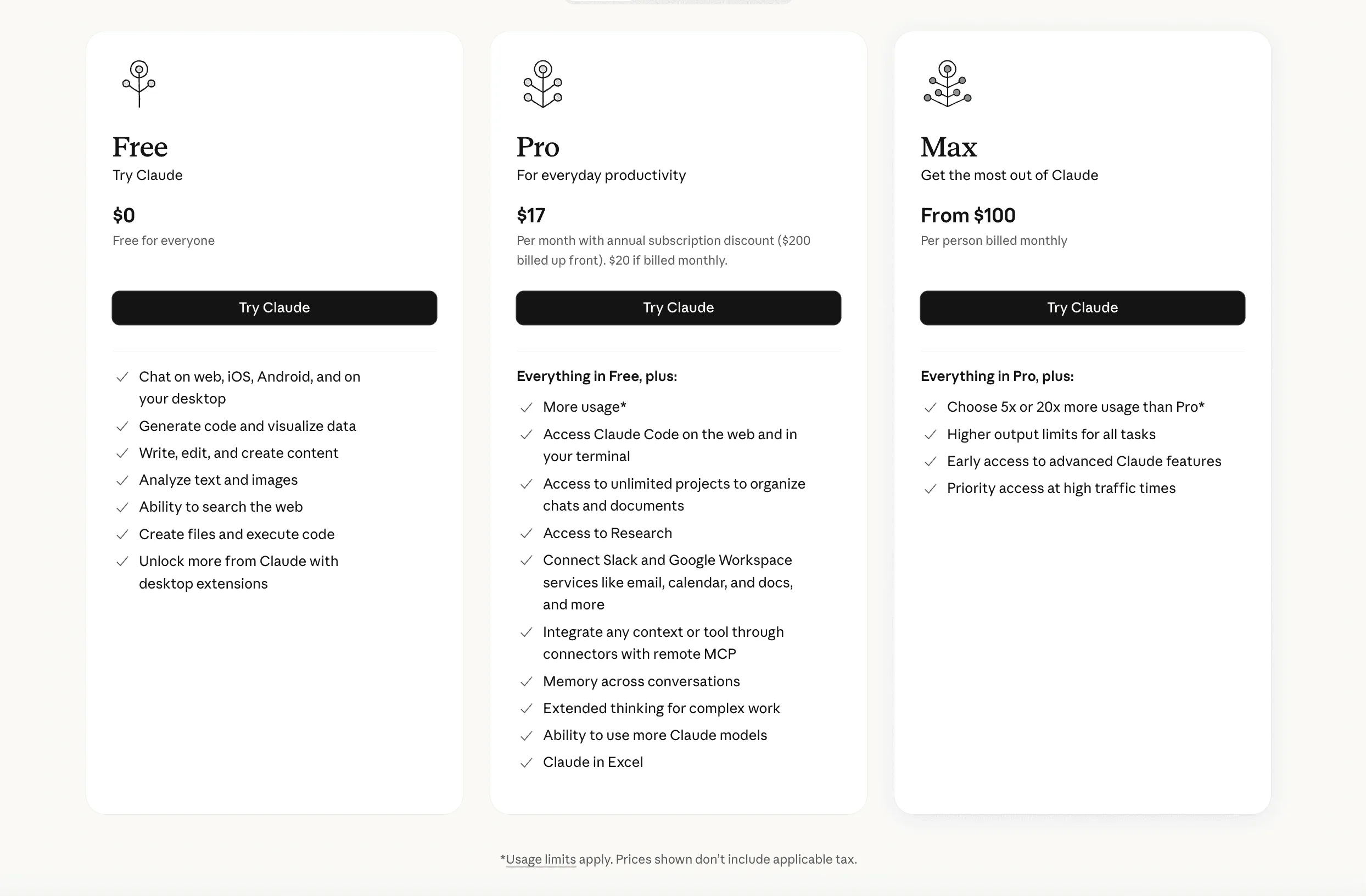
Quick answer: Claude Code costs $20–$200/month for individuals: Pro is $20/month ($17/month billed annually), and Max is $100 or $200/month for 5x or 20x Pro’s usage. Team plans run $25/user/month (Standard) or $150/user/month (Premium), minimum 5 users — but only Premium seats include the Claude Code CLI; Standard seats and the free plan don’t.
Claude Code is Anthropic’s AI coding agent — it lives in your terminal, reads your codebase, writes code, runs tests, and handles multi-file changes autonomously.
But the pricing isn’t as simple as picking a plan. Subscriptions, token costs, model tiers, long-context surcharges — it adds up in ways that aren’t obvious upfront.
Here’s the full breakdown as of 2026, what each plan actually gets you, and where the money goes.
Claude’s Subscription Plans
Anthropic offers four tiers for individual users and teams. Claude Code (the AI coding assistant in your terminal) is available on all paid plans, but the experience varies significantly by tier.
Free — $0/month
You get access to Claude’s chat, code generation, and web search. Claude Code works on the web interface for light use.
The catch: strict usage limits. You’ll hit the ceiling fast if you’re doing anything beyond quick questions. Fine for trying it out, not for real work.
Pro — $20/month ($17/month billed annually)
This is where Claude Code becomes usable for daily development. Pro gives you roughly 5x the usage of Free, plus:
-
Claude Code via CLI — Run it in your terminal, inside your actual codebase
-
All models — Access to Opus 4.5, Sonnet 4.5, Haiku 3.5
-
Research mode — Deeper reasoning for complex tasks
-
Google Workspace integration — Connect Gmail, Docs, Calendar
-
Unlimited projects — Organize conversations by feature or repo
At $17/month (annual), this is the plan most solo developers and small teams should start with.
Max — $100 or $200/month
Max is Pro with the throttle removed. Two tiers:
-
$100/month — 5x more usage than Pro
-
$200/month — 20x more usage than Pro
Plus longer conversation memory and early access to new models.
If you’re using Claude Code all day — writing features, debugging, refactoring — Pro’s limits will eventually frustrate you. Max fixes that. The $100 tier handles most power users; the $200 tier is for people who essentially live in Claude Code.
Team — $25–$150/user/month
For organizations. Two seat types:
| Seat Type | Price | Includes Claude Code CLI? |
|---|---|---|
| Standard | $25/user/mo (annual) | No |
| Premium | $150/user/mo | Yes |
Minimum 5 users. Adds SSO, admin dashboards, usage tracking, Slack/Microsoft 365 connectors. Extra usage beyond plan limits is billed at standard API token rates.
Enterprise — Custom Pricing
Everything in Team, plus larger context windows, audit logs, compliance APIs, SCIM, and fine-grained permissions. Contact Anthropic sales.
The Plan Comparison
| Free | Pro | Max 5x | Max 20x | Team Std | Team Premium | |
|---|---|---|---|---|---|---|
| Price | $0 | $20/mo | $100/mo | $200/mo | $25/user/mo | $150/user/mo |
| Usage vs Free | 1x | 5x | 25x | 100x | 5x | 5x + Code CLI |
| Claude Code CLI | No | Yes | Yes | Yes | No | Yes |
| All models | Limited | Yes | Yes | Yes | Yes | Yes |
| SSO/Admin | No | No | No | No | Yes | Yes |
| Best for | Trying it | Solo devs | Power users | Heavy users | Non-dev teams | Dev teams |
What Claude Code Actually Costs in Practice
The subscription is just the entry fee. The real cost depends on how you use it.
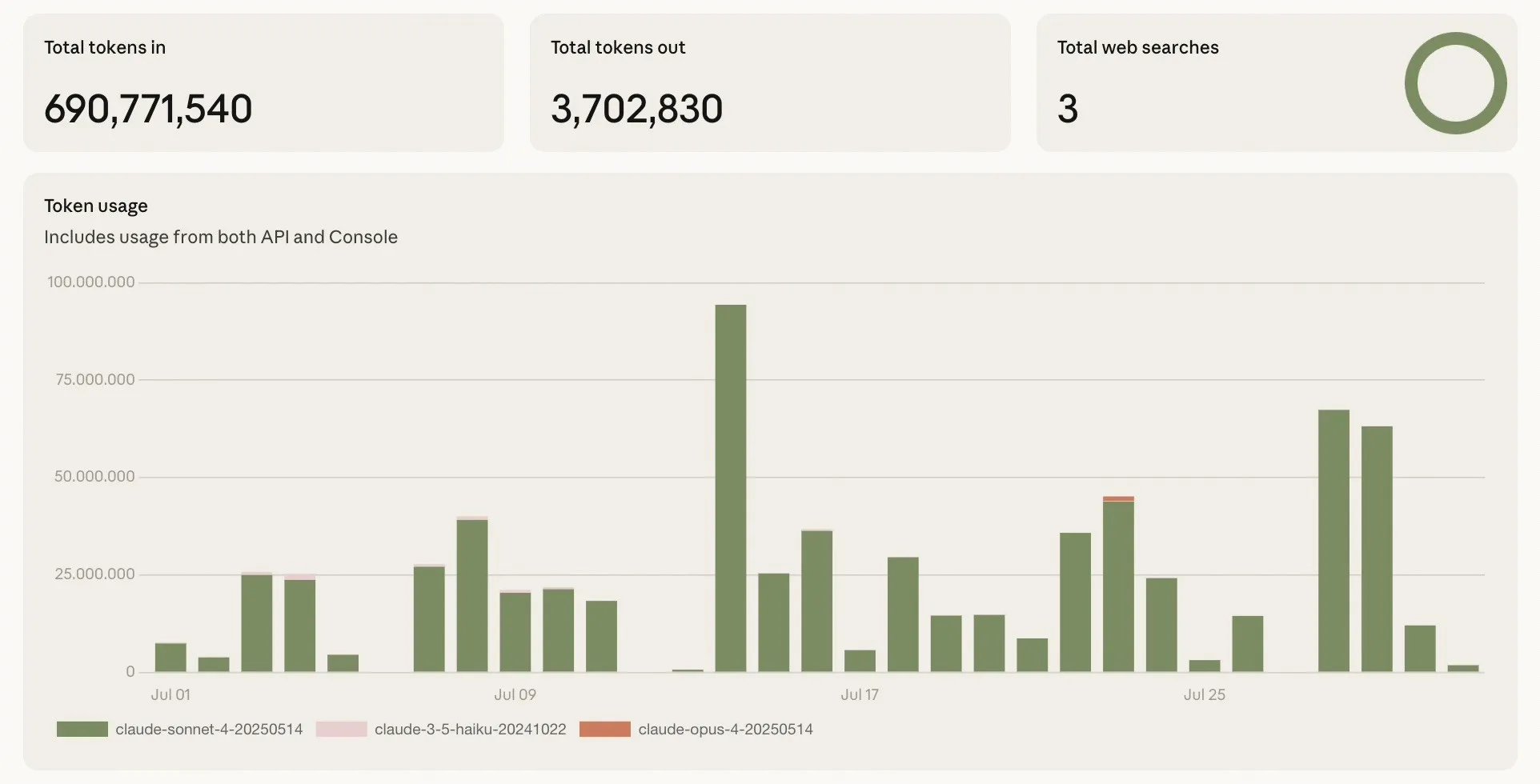
Anthropic published their own data: most developers spend $6/day on average with Claude Code, with 90% of users under $12/day. That translates to roughly $100–$200/month per developer on Sonnet 4.
A typical day of feature development runs $5–$10 in token usage on Sonnet. Heavier days (large refactors, multi-file changes) can push $15–$20.
The /cost command in Claude Code shows your running total. Use it. It’s the difference between “AI is expensive” and actually knowing what you spend.
Choosing the Right Model
The model you pick changes the bill dramatically:
| Model | Input (per 1M tokens) | Output (per 1M tokens) | Best For |
|---|---|---|---|
| Opus 4.5 | $5.00 | $25.00 | Complex reasoning, architecture decisions |
| Sonnet 4.5 | $3.00 | $15.00 | Daily coding, features, tests |
| Sonnet 4.5 (>200K context) | $6.00 | $22.50 | Large codebases, long files |
| Haiku 3.5 | $0.80 | $4.00 | Quick edits, simple tasks |
The smart approach: Sonnet 4.5 for 90% of work. Opus for architecture decisions and tricky debugging. Haiku for quick one-liners. This keeps daily costs in the $5–$10 range while still having access to the most capable model when it matters.
The Long-Context Tax
This one catches people off guard. If your request exceeds 200K input tokens, Sonnet’s pricing doubles — $6 input and $22.50 output instead of $3/$15.
On a mid-size codebase (Next.js, dozens of routes, 100+ files), Claude Code can easily pull in 200K+ tokens of context when working on cross-cutting features. That’s when costs spike.
Tips to manage it:
-
Use .claudeignore to exclude node_modules, build artifacts, and irrelevant directories
-
Keep conversations focused — reset when switching tasks
-
Let Claude Code’s auto-compaction handle long sessions instead of fighting it
Batch API: 50% Off
If you’re using Claude’s API directly (not Claude Code), batch processing cuts token costs in half. Opus 4.5 drops to $2.50/$12.50, Sonnet to $1.50/$7.50.
This is ideal for bulk processing — classification, summarization, data extraction — where you don’t need instant responses. If you’re running AI features in a product, batch processing can cut your inference costs in half.
Pro vs Max: The Real Decision
For most developers, the question is: Pro ($20/mo) or Max ($100/mo)?
Here’s how to think about it:
Stay on Pro if:
-
You use Claude Code a few hours a day
-
You’re mostly working on focused tasks (one feature, one file)
-
You can reset conversations without losing context
-
You’re budget-conscious and can work within limits
Upgrade to Max $100 if:
-
Claude Code is your primary development tool, 6+ hours/day
-
You frequently hit usage limits on Pro mid-task
-
You work on large refactors that need sustained context
-
The lost productivity from hitting limits costs more than $80/month
Upgrade to Max $200 if:
-
You literally live in Claude Code all day
-
You’re running multiple long sessions across different projects
-
You still hit limits on the $100 Max plan
For context: if you’re billing $100+/hour as a developer or running a team, even the $180 difference between Pro and Max 20x is less than two hours of lost productivity. The math is straightforward.
How Claude Code Compares
Claude Code doesn’t exist in a vacuum. Here’s how it stacks up against alternatives:
vs GitHub Copilot
| Claude Code (Pro) | Copilot Pro | Copilot Pro+ | |
|---|---|---|---|
| Price | $20/mo | $10/mo | $39/mo |
| How it works | Agentic — reads codebase, runs commands, edits files | Autocomplete + chat + coding agent | Same, with more premium requests |
| Context | Full repo awareness (200K+ tokens) | File-level context | File-level context |
| Terminal access | Yes — runs tests, git, build tools | No | No |
| Multi-file edits | Yes — creates, modifies, deletes files | Limited | Limited |
| Premium requests | Usage-based (tokens) | 300/month | 1,500/month |
Copilot is cheaper and great for autocomplete. It now has a coding agent too, but Claude Code’s terminal-native approach gives it deeper codebase awareness and the ability to run commands, execute tests, and verify its own work. They’re complementary more than competitive.
vs ChatGPT + Codex
| Claude Code (Pro) | ChatGPT Plus | |
|---|---|---|
| Price | $20/mo | $20/mo |
| Coding agent | Claude Code (terminal CLI) | Codex (cloud-based) |
| Codebase awareness | Reads your local files directly | Cloud environment, needs repo sync |
| Top-tier plan | Max at $200/mo | Pro at $200/mo |
| API token costs | Sonnet: $3/$15 per 1M | GPT-5 Codex: $1.25/$10 per 1M |
Same price at the entry level. OpenAI’s Codex runs in the cloud and is tightly integrated with ChatGPT. Claude Code runs locally in your terminal. OpenAI has cheaper API token rates on their newest Codex models, but Claude Code’s local-first approach means faster iteration — no waiting for cloud environments to spin up.
vs Cursor / Windsurf
| Claude Code | Cursor Pro | |
|---|---|---|
| Price | $20/mo | $20/mo |
| Interface | Terminal (CLI) | VS Code fork |
| Editor lock-in | None — works with any editor | Must use Cursor editor |
| Model choice | Any Claude model | Multiple providers |
Cursor gives you a polished IDE experience. Claude Code gives you editor freedom. If you’re already happy in VS Code, Neovim, or JetBrains, Claude Code doesn’t make you switch.
Is It Worth It?
If you write code for a living, yes. The $20/month Pro plan pays for itself the first time Claude Code writes a test suite, catches a bug you missed, or scaffolds a feature in minutes instead of hours.
The pricing is fair. Sonnet 4.5 at $3/$15 per million tokens is cheap for what you get. The subscription plans are in line with every other dev tool. And unlike most AI tools, Anthropic is transparent about actual costs — the /cost command, the published usage data, the clear per-token pricing.
The only question is which plan. Start with Pro. If you hit limits regularly, upgrade to Max. If you’re a team, do the math on Premium seats vs individual Pro subscriptions.
Building a SaaS Product?
If you need a feedback loop for your users — feedback boards, public roadmaps, and changelogs — check out fdback. Free plan, no credit card, no user limits.
Quick Links
-
Anthropic Pricing Page — Official plan details
-
Claude Code Docs — Setup and usage guide
-
API Pricing — Per-model token costs
Comparing Other Tools?
We’ve written breakdowns of feedback and product tools too:
-
Canny Alternative — Tracked-user pricing that scales against you
-
Featurebase Alternative — Per-seat pricing plus AI resolution fees
-
Beamer Alternative — MAU pricing and $99/month add-ons
More insights to explore
Canny vs UserVoice 2026: Is the Enterprise Price Worth It?
Canny starts at $79/mo self-serve; UserVoice starts at $999/mo behind a sales call. We compare pricing, features, and who each tool is really built for.
The 9 Best Canny Alternatives in 2026 (Honestly Compared)
Looking for a Canny alternative? We compare 9 feedback tools on pricing, features, and the full feedback loop — from free plans to $999/mo enterprise.

In-App Feedback Widget for SaaS: The Complete Setup Guide
In-app feedback widgets collect 3x more feedback than separate pages. Complete setup guide for SaaS teams, plus tool comparisons.

Feature Request Response Templates: 10 Copy-Paste Replies for Every Situation
Ten copy-paste feature request response templates for every situation: acknowledging, planned, shipped, duplicates, declines, and workarounds.
Frill vs Nolt 2026: Idea Caps or Board Caps?
Frill caps ideas and sells add-ons; Nolt caps boards and has no free plan. Both now ship changelogs. Pricing tables, feature gaps, and which one fits.
Featurebase vs Nolt 2026: All-In-One Suite or Minimal Board?
Featurebase bundles feedback, support, and AI at $29–99 per seat. Nolt is a flat $29–69/mo board with roadmap and changelog. Honest 2026 comparison with real costs.