
Feature Voting Boards: The Complete Guide for SaaS Teams
18 min readUpdated October 20, 2026
On this page▾
- How Feature Voting Works
- Why Feature Voting Matters for SaaS
- Feature Voting vs. Other Feedback Methods
- How to Set Up a Feature Voting Board (Step by Step)
- Best Practices for Running a Feature Voting Board
- The 7 Pitfalls That Kill Feature Voting Boards
- Feature Voting Tools: Comparison for SaaS Teams
- Advanced Strategies: Getting More From Your Voting Board
- Frequently Asked Questions
- Start Collecting Feature Votes Today
A feature voting board is a page where your users submit feature ideas and vote on each other’s requests. The most-voted ideas rise to the top. You get a ranked list of what your users actually want — not what you think they want.
If you’ve ever spent weeks building a feature nobody used, or found yourself paralyzed by dozens of conflicting requests from support tickets, Slack messages, and sales calls, a voting board solves both problems at once.
This guide covers how feature voting works, when it helps (and when it misleads), how to set one up properly, and how to avoid the traps that make most voting boards useless after three months.
How Feature Voting Works
The concept is simple. You create a board. Users post ideas. Other users upvote the ideas they want. You see what rises to the top.
Here’s the typical flow:
1. A user submits an idea — They visit your feedback board and write something like: “Add dark mode” or “Let me export reports as CSV.” Good boards let users add a title and a short description explaining their use case.
2. Other users discover it — When someone visits your board, they see existing ideas. If they find one that matches what they need, they upvote it instead of creating a duplicate. This naturally consolidates requests.
3. Votes accumulate — Over days and weeks, ideas collect votes. Some get 5. Some get 50. Some get 200. The vote count becomes a signal of demand.
4. You review and prioritize — Sort by most votes. Now you have a ranked list of what your users want most. Combine this with your own product strategy, technical complexity, and business goals to decide what to build.
5. You update the status — Move ideas through statuses: Under Review → Planned → In Progress → Shipped. Users who voted get notified at each step.
6. The loop closes — When you ship a feature, every voter gets an email: “The feature you requested is live.” They come back, try it, and often submit more feedback. The cycle repeats.
That’s the entire system. It takes about 30 minutes to set up and runs mostly on autopilot after that.
Why Feature Voting Matters for SaaS
Every SaaS team collects feedback. The question is whether that feedback is organized or scattered.
Here’s what happens without a voting board:
-
A customer emails support asking for an integration. The support agent logs it somewhere — maybe a spreadsheet, maybe a Slack channel, maybe nowhere.
-
A prospect tells sales they need a specific feature to sign. Sales passes it along in a meeting. It gets discussed once and forgotten.
-
A user tweets about a missing feature. Someone on the team screenshots it and drops it in a Notion doc.
-
The founder remembers a conversation from three months ago where someone asked for something. But they can’t remember what exactly.
Six months later, the team sits down to plan the next quarter. They have fragments of feedback across five channels. Nobody knows how many people actually want each feature. The loudest voice or the most recent conversation wins.
A voting board replaces this with a single source of truth. Here’s what changes:
Every Request Lives in One Place
Instead of support tickets, Slack messages, emails, tweets, and Intercom chats each containing fragments of feedback, everything goes to one board. Users submit directly. Your team can add ideas on behalf of users from other channels. Nothing gets lost.
Demand Is Quantified, Not Guessed
When 47 users vote for CSV export and 3 vote for XML export, the decision is obvious. Without a voting board, both of those requests look the same in your inbox — someone asked for it. The voting board adds magnitude.
Duplicate Requests Collapse Automatically
Without a board, you might get the same request phrased 15 different ways across 15 support tickets. With a board, the second person who wants the same thing finds the existing idea and upvotes it. Duplicates merge into signal.
Users Feel Heard
Submitting a feature request into a support form feels like shouting into a void. Voting on a public board where you can see the vote count and the status feels like participating. Users who feel heard churn less. It’s that simple.
Your Team Saves Hours Per Week
Instead of manually tagging, categorizing, and cross-referencing feedback from five channels, your product manager opens the board, sorts by votes, and sees the priorities. The board does the aggregation work for you.
Feature Voting vs. Other Feedback Methods
Feature voting isn’t the only way to collect feedback. Here’s how it compares to alternatives and when to use each:
Surveys (NPS, CSAT, In-App)
Surveys are great for measuring sentiment — how happy are users overall? But they’re terrible at surfacing specific feature requests. A user might rate you 6/10 on an NPS survey without ever telling you why. Surveys tell you there’s a problem. Voting boards tell you what to build.
Use surveys for: Overall satisfaction, churn risk signals, onboarding friction. Use voting boards for: Specific feature prioritization, understanding demand.
User Interviews
Interviews give you deep qualitative insight into why a user needs something. But they don’t scale. You can interview 10 users per month. You can collect votes from 1,000. Interviews are a complement to voting, not a replacement.
Use interviews for: Understanding context, validating complex ideas, discovering problems users can’t articulate. Use voting boards for: Quantifying demand across your entire user base.
Support Tickets
Support tickets capture pain points, but they’re biased toward problems, not opportunities. Users write to support when something breaks, not when they wish something existed. And support teams rarely have a system for aggregating feature requests across hundreds of tickets.
Use support tickets for: Bug tracking, urgent issues, customer satisfaction. Use voting boards for: Proactive feature discovery and prioritization.
Internal Brainstorming
Your team has good ideas. But without user validation, you’re guessing. A voting board lets you post internal ideas and see if users actually want them before you invest development time.
Use brainstorming for: Innovation, exploring new directions. Use voting boards for: Validating which directions users care about.
The best SaaS teams use all of these methods. But the voting board is the connective tissue that ties them together — the single place where all feedback, regardless of source, gets quantified and ranked.
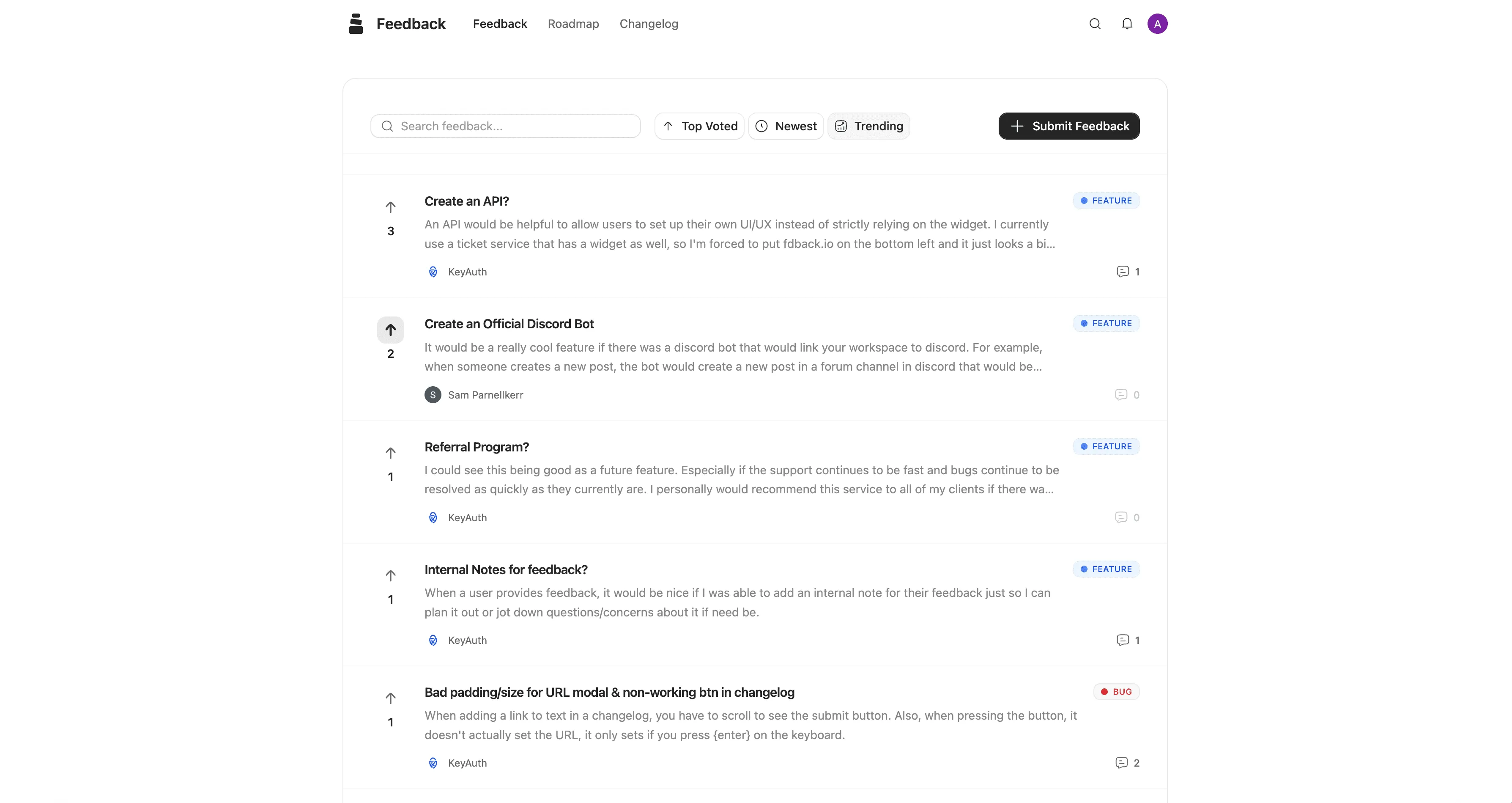
How to Set Up a Feature Voting Board (Step by Step)
You can have a working voting board live in under an hour. Here’s the process.
Step 1: Choose Your Tool
You have several options:
Dedicated feedback tools — Purpose-built for collecting, voting, and managing feature requests. These come with boards, voting, statuses, notifications, roadmaps, and changelogs. Examples: fdback, Canny, Frill, Nolt, Feature Upvote.
Project management tools — Trello, Notion, or Linear with a public-facing board. These work for basic use but lack built-in voting, auto-notifications, and the feedback-to-roadmap pipeline. Users often need to create third-party accounts.
Custom-built — Your own solution, built on your stack. Maximum flexibility, maximum maintenance. Only makes sense if you have unique requirements that no existing tool covers.
For most teams, a dedicated tool is the right call. The time you save on manual feedback management pays for the subscription within the first month.
Step 2: Create Your Board Categories
Organize your board into categories that match how your users think about your product. Don’t over-categorize — 3 to 6 categories is the sweet spot.
Examples of good categories:
-
Feature Requests — New functionality users want
-
Improvements — Enhancements to existing features
-
Integrations — Connections with other tools
-
Bug Reports — Things that aren’t working (optional — some teams keep this separate)
Avoid internal jargon. “API Enhancements” means nothing to most users. “Connect with other tools” does.
Step 3: Configure Voting and Submission Rules
Decide on a few ground rules:
Who can submit ideas? — Anyone? Only logged-in users? Only paying customers? For most SaaS products, allowing anyone to submit (with a lightweight sign-in via Google or magic link) works best. It minimizes friction while preventing spam.
Who can vote? — Same options. A lightweight sign-in prevents ballot stuffing while keeping the barrier low.
Can users see vote counts? — Yes, in most cases. Visible vote counts encourage participation because users see that others share their needs. Some teams hide counts to prevent herd behavior, but this usually reduces engagement more than it helps.
Can users comment on ideas? — Yes. Comments add context that raw votes can’t capture. A user explaining why they need CSV export (“I need to send weekly reports to my board”) is more valuable than the vote alone.
Step 4: Seed the Board With Existing Requests
Don’t launch an empty board. Go through your last 3 months of:
-
Support tickets mentioning feature requests
-
Sales call notes where prospects asked for something
-
Internal product discussions
-
Competitor comparison feedback
Add the 15-20 most common requests to your board. This gives new visitors something to vote on immediately and prevents the “empty room” problem where nobody wants to be the first to post.
Step 5: Define Your Statuses
Set up statuses that communicate your pipeline:
-
Open — Submitted, not yet reviewed
-
Under Review — Your team is evaluating this
-
Planned — You’ve decided to build it
-
In Progress — Development has started
-
Shipped — It’s live
When you move an idea through these statuses, voters should get notified automatically. If your tool supports it, link Shipped items to your changelog so users can read about what you built and how to use it.
Step 6: Embed It in Your Product
A voting board that lives on a separate URL only captures feedback from users who go looking for it. The real power comes from embedding it inside your product:
-
Feedback widget — A small button or tab inside your app (“Got an idea?”) that opens the board
-
In-context prompts — After a user completes a task, ask: “How can we improve this?”
-
Help menu integration — Add “Suggest a feature” alongside “Contact support”
The closer the board is to where users experience friction, the better the feedback you’ll collect.
Step 7: Share It and Build the Habit
Launch your board publicly:
-
Add a “Feedback” or “Feature Requests” link to your website footer or navigation
-
Set up a custom domain (feedback.yourdomain.com)
-
Include it in your onboarding email sequence (“Help us build what you need →”)
-
Share it in your community (Slack, Discord, Twitter)
-
Mention it in support replies: “Great idea — I’ve added it to our feedback board. You can track it and vote here: [link]”
The goal is to make your voting board the default answer to “I wish your product could do X.” Every time someone requests a feature through any channel, redirect them to the board.
Best Practices for Running a Feature Voting Board
Setting up the board is the easy part. Running it well is what separates useful boards from abandoned ones.
Review New Submissions Weekly
Set a weekly cadence — 15 to 30 minutes — to review new submissions. Merge duplicates, respond to comments, update statuses, and flag items worth discussing with your team. A board that gets regular attention stays healthy. A board that gets ignored for months dies.
Respond to Ideas, Even If the Answer Is No
When users submit ideas, acknowledge them. A quick comment like “Thanks for this — we’re evaluating how it fits with our roadmap” takes 10 seconds and makes the user feel heard.
If you decide not to build something, say so. Mark it as “Not Planned” with a brief explanation: “We’ve decided not to pursue this because it conflicts with our focus on X. Thanks for the suggestion.” Users respect honesty more than silence.
Merge Duplicates Aggressively
Users will submit the same idea with different wording. “Dark mode,” “Night theme,” and “Dark UI” are all the same request. Merge them so votes consolidate. Most dedicated tools have a merge feature. If yours doesn’t, close duplicates with a comment linking to the original.
Use Votes as Input, Not as a Mandate
This is the most important practice. Votes tell you what’s popular. They don’t tell you what’s strategically important.
Some features will never get many votes but are critical for your business: security improvements, performance optimization, infrastructure upgrades. Build those anyway.
Some features will get lots of votes from free users but won’t move the needle for paying customers. Segment your data if possible — votes from paying users should carry more weight than votes from free accounts.
The voting board is one input into your prioritization. Combine it with revenue impact, technical feasibility, strategic alignment, and your product vision.
Segment Feedback by User Type
If your tool supports it, segment votes by customer plan (free vs. paid), company size, or usage level. Fifty votes from free-tier users is a different signal than fifty votes from enterprise customers paying $500/month.
This doesn’t mean free-user feedback doesn’t matter. But when resources are limited, understanding who is asking helps you make better tradeoffs.
Close the Loop Every Time
When you ship a feature that users voted for, three things should happen:
-
The idea status changes to “Shipped”
-
Voters receive an automatic notification
-
A changelog entry goes live explaining the feature
This is the moment where your voting board generates ROI. The user who voted six months ago gets an email saying “Your feature is live” — they come back, see the improvement, and their trust in your product deepens. Some will share the update with their team or on social media.
Without this step, you’re collecting feedback but never proving that it mattered. And users who never see results stop contributing.
The 7 Pitfalls That Kill Feature Voting Boards
Most voting boards fail not because the idea is wrong, but because of avoidable execution mistakes.
Pitfall 1: Building Whatever Has the Most Votes
Also known as “democracy-driven development.” If you blindly build the top-voted features, you’ll end up with a product designed by committee — a collection of unrelated features that doesn’t serve any user group well.
Votes are signal. Your product vision is the strategy. Use votes to inform your roadmap, not to dictate it.
Pitfall 2: Letting the Board Get Stale
If nothing moves for three months — no status updates, no responses, no shipped items — users conclude the board is a graveyard. They stop voting because they’ve learned that voting leads nowhere. Review weekly. Ship visibly. Keep things moving.
Pitfall 3: Too Many Categories
More than 6 categories and users don’t know where to post. They get confused, submit in the wrong place, or give up. Start with 3-4 categories. Add more only when you consistently see submissions that don’t fit.
Pitfall 4: Requiring Account Creation to Vote
If users need to create a separate account on a third-party platform (like Trello) to vote, most won’t bother. Use a tool with SSO, magic link, or Google sign-in. The fewer clicks between “I want this feature” and “voted,” the better.
Pitfall 5: No Response to Submissions
Silence is the worst response. Even a simple “Thanks, we’ll review this” is better than nothing. Users who feel ignored don’t just stop contributing — they start resenting the process. They wonder why you asked for feedback if you’re not listening.
Pitfall 6: Not Merging Duplicates
Unmerged duplicates fragment votes. If “Dark mode” has 30 votes and “Night theme” has 25 votes, neither shows its true demand of 55. This can cause you to underestimate demand for popular features and overestimate demand for niche ones.
Pitfall 7: Only Collecting Feedback From Power Users
Your most active users submit the most ideas. But they’re not representative of your entire user base. Passive users — the majority — have needs too. Use in-app prompts and contextual widgets to capture feedback from users who would never proactively visit a feedback board.
Feature Voting Tools: Comparison for SaaS Teams
The tool you choose determines how much manual work you do and how much value you extract from the board. Here’s how the main options compare.
Dedicated Feature Voting Tools
| Tool | Starting Price | Free Plan | Auto-Notifications | Roadmap | Changelog | Key Difference |
|---|---|---|---|---|---|---|
| fdback | $15/mo flat | ✅ Full features | ✅ | ✅ | ✅ | Flat pricing, AI-powered feedback, complete loop |
| Canny | $99/mo | ✅ (25 users) | ✅ | ✅ | ✅ | Per-tracked-user pricing, popular with larger teams |
| Frill | $25/mo | ❌ | ✅ | ✅ | ✅ | 50-idea cap on Startup plan |
| Nolt | $29/mo per board | ❌ | ✅ | ✅ | ✅ | Flat per-board pricing, no free plan |
| Feature Upvote | $49/mo per board | ❌ | ✅ | ❌ | ❌ | No account required to vote, per-board pricing |
| Supahub | $19/mo | ✅ | ✅ | ✅ | ✅ | MRR-based prioritization |
| UserVoice | $899/mo | ❌ | ✅ | ✅ | ✅ | Enterprise-grade, high price |
Adapted Tools (Not Purpose-Built)
| Tool | Voting | Notifications | Roadmap | Downsides |
|---|---|---|---|---|
| Trello | ⚠️ Card voting | ❌ | ⚠️ Public board | Users need Trello accounts |
| Notion | ❌ | ❌ | ⚠️ Published page | No voting, fully manual |
| GitHub Issues | ⚠️ Reactions | ❌ | ❌ | Technical audience only |
| Google Sheets | ❌ | ❌ | ❌ | No voting, no public view, manual everything |
The critical difference between dedicated tools and adapted tools is the feedback loop. Dedicated tools handle the complete pipeline — submit → vote → plan → build → ship → notify — automatically. Adapted tools require you to manage each step manually, which means the loop usually breaks somewhere.
Advanced Strategies: Getting More From Your Voting Board
Once your board is running and generating votes, here are strategies to extract more value.
Strategy 1: Use Voting Data in Sales Calls
When a prospect asks “Do you support X?”, don’t just say “not yet.” Say: “That’s one of our top-voted features — 83 users have requested it and it’s on our roadmap for this quarter. You can track the progress here.”
This turns a missing feature into a trust-building moment. The prospect sees that other users want the same thing, that you’re transparent about your plans, and that you have a system for listening to customers.
Strategy 2: Create Feedback-Driven Content
Your most-voted features are content goldmines. If 100 users vote for “Slack integration,” write a blog post: “How We Built Our Slack Integration (And Why You Asked For It).” This content drives SEO traffic, showcases your product development process, and gives voters a satisfying conclusion to their request.
Your voting board data also tells you what topics your users care about — use that to inform your blog, newsletter, and social media strategy.
Strategy 3: Run Internal Voting Alongside Public Voting
Create a separate internal board where your team can submit and vote on ideas. This captures insights from support agents who hear the same request ten times a day, engineers who spot technical opportunities, and sales reps who know what prospects ask for.
Compare internal priorities with public votes. When both your team and your users agree on a feature, it’s a strong signal to build it.
Strategy 4: Weight Votes by Revenue
If your voting tool supports it, weight votes by the voter’s plan or account value. A vote from a $500/month enterprise customer should carry more weight than a vote from a free-tier user — not because their opinion matters less, but because retaining high-value customers has a larger business impact.
Some tools let you attach MRR to votes automatically. If yours doesn’t, at least segment your view to see votes from paying customers separately.
Strategy 5: Connect Voting to Your Roadmap
The most effective setup connects your voting board directly to your public product roadmap. When you decide to build a feature, drag it from the feedback board to your roadmap. The status changes from “Open” to “Planned.” Voters see the update.
This connection is what turns a voting board from a suggestion box into a product development system. The board feeds the roadmap. The roadmap feeds the changelog. The changelog notifies the voters. Each piece reinforces the others.
Frequently Asked Questions
What is a feature voting board?
A feature voting board is a page where users submit feature ideas and vote on requests from other users. The most-voted ideas rise to the top, giving product teams a ranked view of user demand. It’s typically connected to a product roadmap and changelog to create a complete feedback loop.
How does feature voting work?
Users visit the board, browse existing ideas, and upvote the ones they want. If their idea doesn’t exist yet, they submit it with a title and description. Over time, votes accumulate and create a ranked list of user priorities. The product team reviews this data alongside other inputs like business strategy and technical feasibility to decide what to build.
Is feature voting worth it for small SaaS teams?
Yes — arguably more so than for large teams. Small teams have less room for error in what they build. A voting board ensures you’re spending limited development time on features your users actually want rather than guessing. Tools like fdback offer free plans specifically designed for early-stage products.
Should I build everything users vote for?
No. Votes are one input, not a mandate. Some critical work — security, performance, infrastructure — will never get votes but still needs to happen. Some popular features might not align with your product strategy. Use votes to inform your decisions, not to make them for you.
How do I prevent my voting board from becoming a graveyard?
Three things: review new submissions weekly, respond to ideas (even if the answer is “not planned”), and visibly ship features through the board. When users see items moving from “Planned” to “In Progress” to “Shipped,” they trust the process and keep contributing.
What’s the difference between a feature voting board and a public roadmap?
A voting board is where users submit and vote on ideas. A roadmap is where you show what you’ve decided to build. They work together: the voting board is the input (raw user demand), the roadmap is the output (your prioritized plan). The best tools connect both so ideas flow from the board to the roadmap automatically.
How do I handle feature requests I’ll never build?
Be honest. Mark them as “Not Planned” or “Closed” with a brief explanation: “This doesn’t align with our current direction because [reason].” Users respect transparency. What they don’t respect is silence — leaving a request open forever without acknowledging it.
Can feature voting replace user interviews?
No. Voting tells you what users want. Interviews tell you why they want it and uncover needs they can’t articulate. The best product teams use both: voting for breadth (what does the majority want?) and interviews for depth (what’s the underlying problem?).
Start Collecting Feature Votes Today
Here’s the 15-minute version:
-
Sign up — fdback.io gives you a voting board, roadmap, and changelog on the free plan.
-
Add your categories — Feature Requests, Improvements, Integrations. Three is enough to start.
-
Seed 15 ideas — Pull from your support tickets, sales calls, and team knowledge. Add them to the board.
-
Embed the widget — Drop the feedback widget into your app so users can submit ideas without leaving your product.
-
Share the board — Link it in your footer, onboarding emails, and community channels.
That’s it. Your users already know what they want. Give them a place to tell you.
More insights to explore
SaaS Changelog Best Practices: The Complete Guide to Product Updates That Reduce Churn
Learn how to write a SaaS changelog that drives feature adoption. Includes examples, setup guide, mistakes to avoid, and how to notify voters.

UserVoice Pricing Explained: What You Actually Pay in 2026
UserVoice starts at $999/month with a 200-user cap. We break down every plan, explain the hidden costs, and compare alternatives that cost 95% less.
Canny vs Sleekplan 2026: Is the Price Gap Worth It?
Sleekplan tops out at $38/mo while Canny can run into the hundreds. What the extra money buys, where Sleekplan's meters bite, and which tool to pick.
The 7 Best UserVoice Alternatives in 2026 (Honestly Compared)
UserVoice starts at $999/month with a 200-user cap and no public roadmap. We compare 7 alternatives on pricing and features — from $0 to enterprise.
Frill vs Sleekplan 2026: Add-Ons vs Meters — Which Costs Less?
Frill's add-ons and Sleekplan's usage meters both inflate the sticker price. Side-by-side plans, real cost scenarios, and which one is actually cheaper.
Featurebase vs Frill 2026: Which Modern Feedback Board Wins?
Featurebase charges per seat plus AI fees; Frill is flat-rate with add-ons and idea caps. Full pricing math, feature tables, and the winner by team size.